

This is a series where we will discuss important concepts of AI for Product Managers → Subscribe
Imagine you are a Product Manager at Adobe.
You are building a Platform for Designers where they can upload their creations, find inspiration, and discover resources.
You have talked to several designers, and one feature that kept coming up in user feedback was the ability to find visually similar images.
So you think about it and come up with a feature: A designer uploads a mood board image and wants to find other assets in our library with a similar aesthetic — the same colour palettes, textures, or overall style.
2 ways of solving this Problem
Approach 1 — Keyword Tagging-Based Search
Imagine users tag their uploaded images with keywords like “blue,” “sky,” or “landscape.” When someone searches for “blue sky,” the system only shows images explicitly tagged with those words.
This keyword-based approach is simple to implement initially.
However, it’s limiting because users might use different words for the same visual concept, and tags often miss nuanced similarities like gradients that can’t be described with single words easily.
This leads to users missing relevant images and a less rich discovery experience.
Approach 2 — ( After this, You will become EXPERT at Embeddings)
How about we give some secret code to each Image?
Instead of relying on words, can we give something like a “visual DNA” for each image? This “DNA” is a list of numbers — an embedding. And we use this embedding to find the similar Images.
Why is it required? Because you can do computation on Mathematical computation on Numbers, that’s where it becomes important to convert the Image into Numbers.
Think of it like this:
Every image gets its own unique list of numbers (the embedding).
Images that look alike have very similar numbers ( the embedding)
Closers the Numbers, Similar the Images
But the Question is, How do we get Embeddings?
Yes we discussed that we will give Images the Visual DNA — Embeddings, but how? How can we assign Numbers to an Image?
So, first let’s understand that the Image is nothing but a group of numbers.
Think of a digital image not as a picture, but fundamentally as a grid of tiny colored dots called pixels. Each pixel’s colour can be represented by numbers (e.g., for red, green, and blue intensity).
Therefore, an entire image can be seen as a very large array or group of numbers. However, these raw pixel numbers don’t directly tell us about the image’s content or visual style in a way that’s easy to compare for similarity. Image embeddings provide a more insightful and compressed numerical representation.
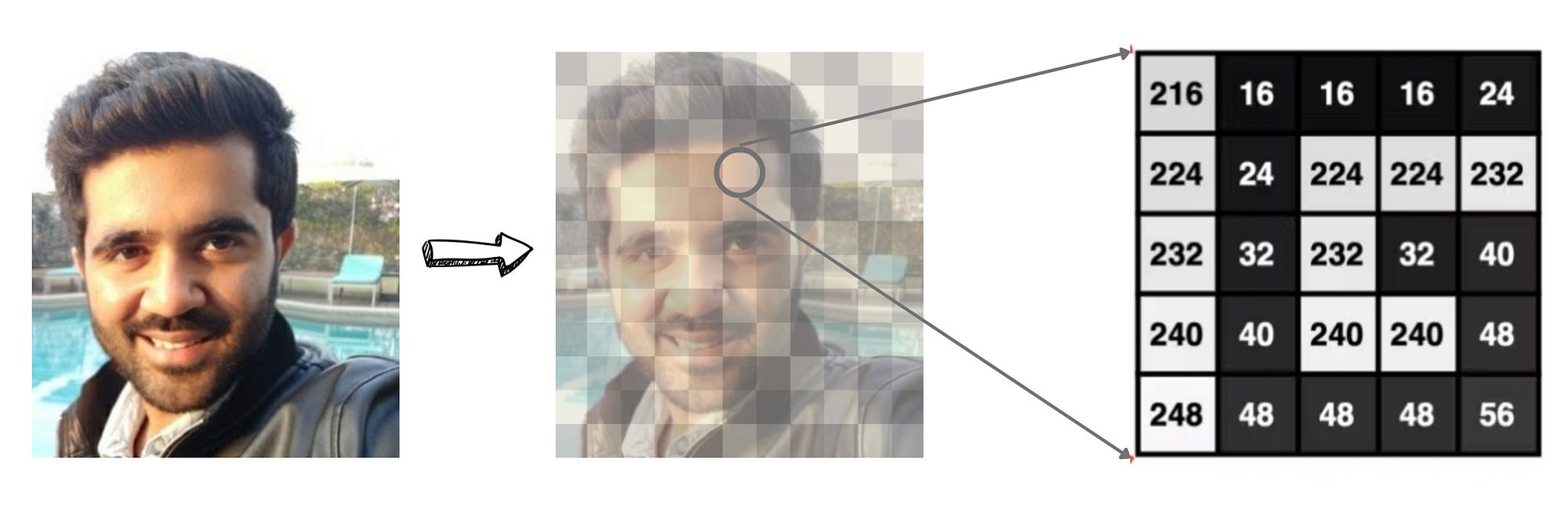
Image Embeddings are the numerical representation of the Image into a lower dimension, and they condense the complexity of the Data into a simpler form.
3 Key steps to create Embeddings
Image is passed to a Machine Learning Model ( deep learning model called a Convolutional Neural Network (CNN) ). Think of it as a multi-layered filter that learns to extract increasingly complex features from images as they pass through its layers.
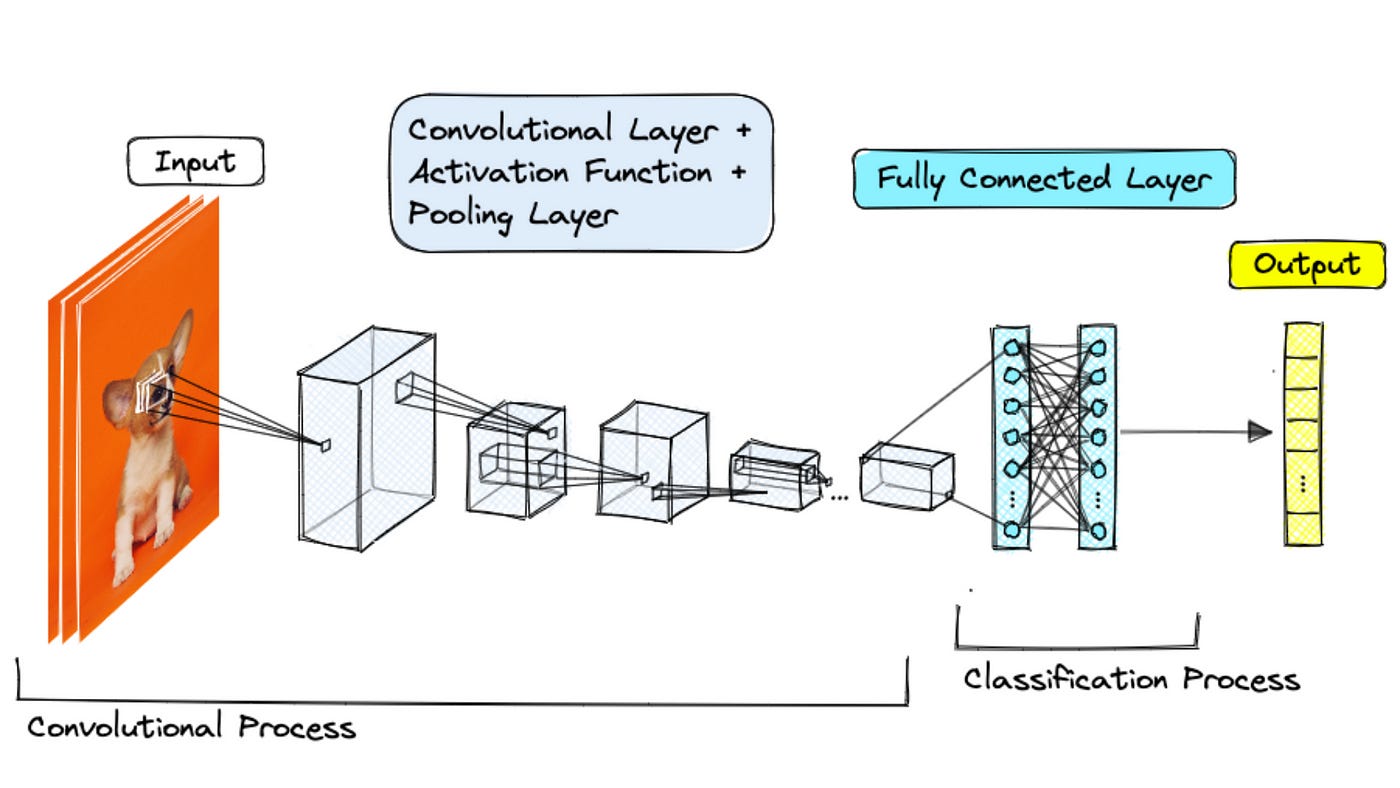
Here’s a simplified analogy:
First Layers: These might detect basic elements like edges, corners, and simple colours within the image.
Middle Layers: These build upon the initial features to identify more complex shapes, textures (like smooth or rough), and patterns.
Later Layers: These learn to recognise high-level concepts — the overall structure of an object, the style of a painting, or even the presence of specific objects (though for similarity, we focus more on the visual style).
After processing the image through all these layers, the final output is that list of numbers — the embedding vector.
[0.23, -0.87, 1.12, 0.05, -0.56, ..., 0.99, -0.11]There are open APIs Available to get Embeddings.
Each number captures some aspect of the image’s visual characteristics. One number might relate to the prevalence of warm colors, another to the amount of sharp edges, another to a certain texture pattern, and so on. The position and magnitude of these numbers are crucial. Images with similar visual properties will have embedding vectors with similar values in corresponding positions.
What will you do after Embeddings?
Now you have got the Embedding of N Images.
As in you have the vector Representation of N Images. How would you go about Similarity?
We use distance metrics to measure how “far apart” these vectors are in our high-dimensional space. Think of each embedding as a point in a space with hundreds of dimensions.
Images that look alike will have their embedding points clustered close together.
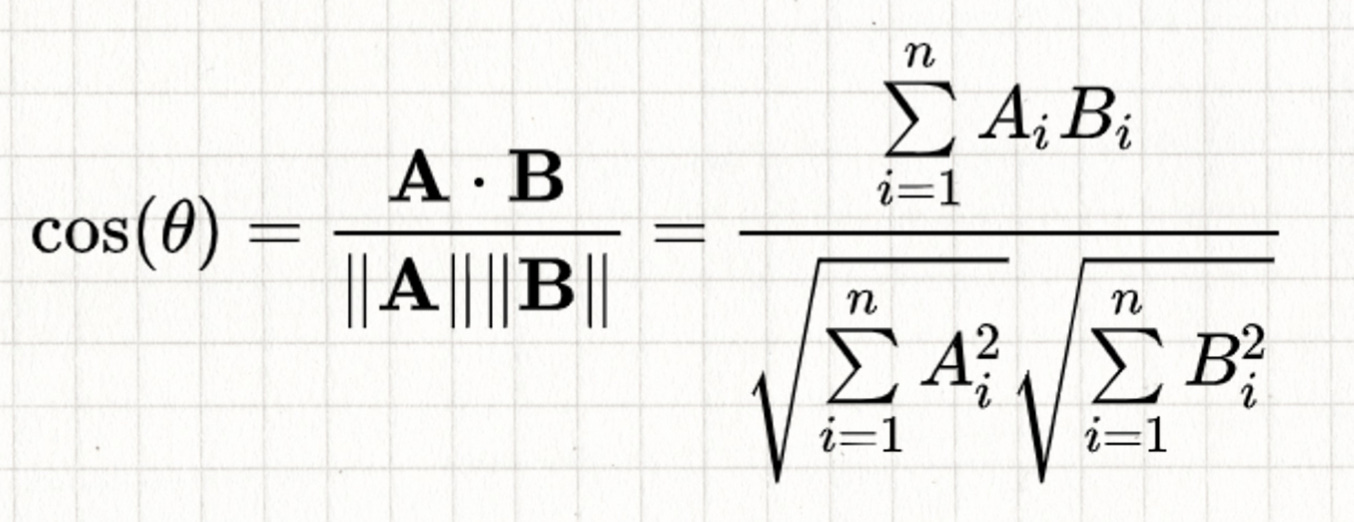
One of the most common distance metrics we discussed is cosine similarity.
Cosine Similarity: It measures the angle between two embedding vectors. If the angle is small (close to 0 degrees), the cosine similarity is close to 1, indicating high similarity. If the angle is large (close to 90 degrees), the cosine similarity is close to 0, indicating low similarity. It focuses on the direction of the vectors, making it good for capturing overall visual style, even if brightness or scale differ.
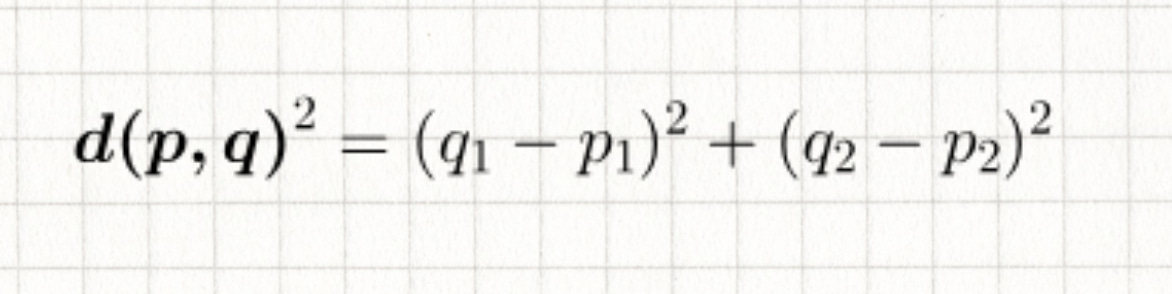
Another important metric is Euclidean distance:
Euclidean Distance: This is the straight-line distance between the two embedding points in the high-dimensional space. A smaller distance means the embeddings are closer, and therefore the images are more similar.
Implementing the Feature
The user uploads the Image and clicks on the clicks the “Find Similar ” button
We get the Embeddings of that image from our vector database.
We then perform a nearest neighbour search in the embedding space. This involves calculating the cosine similarity (or Euclidean distance) between the query image’s embedding and the embeddings of all other images in our library.
We retrieve the top N images with the highest cosine similarity (or lowest Euclidean distance) to the query image.
These visually similar images are then displayed to the user.
The power of image embeddings extends beyond just similarity search:
Automated Image Tagging and Categorisation: Imagine automatically tagging uploaded images with relevant visual attributes, improving searchability and organisation.
Personalised Recommendations: Suggesting visually similar images to users based on their past interactions and preferences.
Put some 5–8 use cases that you think can be solved using Embeddings.
Resource
Crack PM Interview Like top 1% + ( Exclusive Videos of Detailed Solution to PM Interview Question)
Exclusive Videos of Detailed PM Interview Questions Solution
Module 2 — Asking Great Clarifying Questions in PM Interview
About Me
Hey, I’m Shailesh Sharma! I help PMs and business leaders excel in Product, Strategy, and AI using First Principles Thinking.
For more, check out my Live cohort course, PM Interview Mastery Course, Cracking Strategy, and other Resources